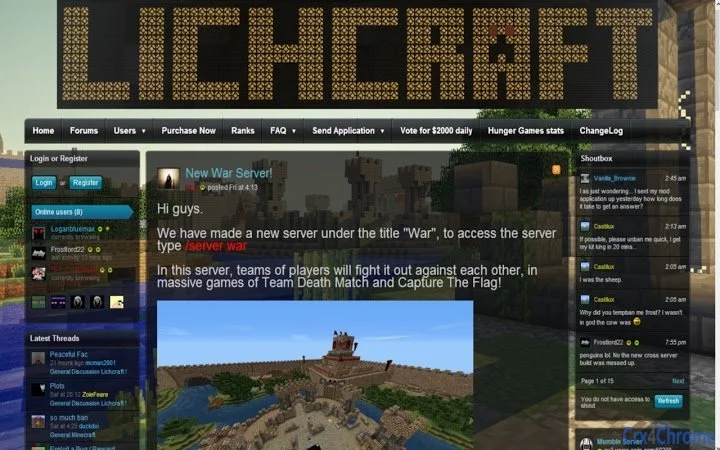

Quick Access to Lichcraft Minecraft Servers
The Lichcraft Minecraft servers site Browser Extension offers a streamlined way to access lichcraft.com with minimal effort. Designed for Minecraft enthusiasts, it simplifies navigation by placing a direct link in the browser’s address bar. When activated, the extension opens a popup with a clickable link, redirecting users to the official Lichcraft server listing page. This tool eliminates the need to manually type the URL or search through bookmarks, making it ideal for frequent users of the site. It targets casual and dedicated Minecraft players who value time efficiency and direct access to server listings. The extension is particularly useful for those who regularly join or explore new servers on Lichcraft. Its purpose is to enhance usability by reducing steps in the access process. While no additional developer background was provided, the tool appears focused on utility and simplicity. Real-world usage includes quick server discovery, joining multiplayer games, and browsing community-hosted servers. The extension supports both Windows and Mac platforms, ensuring broad accessibility across desktop environments.
Key Features & Capabilities
- One-Click Access – A dedicated button in the browser’s address bar allows instant access to lichcraft.com with a single click.
- Popup Redirect Interface – Upon activation, a small popup appears, displaying a clear link to the Lichcraft site for easy navigation.
- Minimalist Design – The extension is built with simplicity in mind, avoiding clutter and focusing on core functionality.
- Platform Compatibility – Supports both Windows and Mac operating systems, ensuring consistent performance across desktop environments.
- Lightweight Size – At just 1.2 MB, the extension requires minimal storage space and does not impact browser performance.
User Interface, Workflow & Performance
The user interface is designed around simplicity and efficiency. A small, unobtrusive button appears next to the browser’s address bar, making it easy to locate and use. The layout of the popup is minimal, displaying only the essential link to lichcraft.com. Navigation is intuitive—users click the button, view the popup, and select the link to proceed. The workflow is linear and requires no setup or configuration, making it accessible even to non-technical users. The extension does not alter the browser’s default behavior, ensuring predictable performance. No performance data was provided, but based on its 1.2 MB size and limited functionality, it is expected to operate with low overhead. The developer did not specify resource usage details, such as CPU or RAM impact. Stability is assumed to be consistent, given the tool’s straightforward nature and lack of complex processes. No known issues were reported in the provided information. The extension does not store user data or track browsing behavior, which supports privacy-conscious usage. General software behavior patterns suggest it remains responsive during normal browser operations. No delays or lag were noted in the described workflow, though actual performance may vary based on system configuration.Compatibility & System Requirements
The extension is compatible with Windows and Mac operating systems, supporting a broad range of desktop environments. It is designed for use with modern web browsers, though specific browser names were not listed. The software version is 1.0, indicating a stable initial release. Installation size is 1.2 MB, which is small and efficient for a browser extension. The developer did not provide additional system requirements. Exact hardware specifications were not specified. Compatibility information was partially provided, with no mention of browser-specific limitations. No minimum processor or memory requirements were listed. Users are advised to ensure their system meets general browser compatibility standards. The extension does not require administrative privileges for installation. No known conflicts with other software were mentioned. Platform compatibility appears broad, but users should verify browser support through official extension marketplaces.Pros and Cons
- Simple, one-click access to Lichcraft server listings
- Minimalist design with low visual clutter
- Small file size (1.2 MB) reduces storage impact
- Works on both Windows and Mac platforms
- Does not require configuration or setup
- No advanced server filtering or search functionality
- Relies on external site for server data and updates
- Does not support offline access
- Functionality limited to redirection only
- Developer background not disclosed
FAQ Section
Is the Lichcraft Browser Extension compatible with my browser?
The extension is designed for use with modern web browsers on Windows and Mac. Specific browser compatibility was not provided, but it is expected to work with mainstream browsers such as Chrome, Firefox, and Safari. Users should check the official extension marketplace for detailed compatibility information.
Is the extension safe to use?
Based on its described functionality and small size, the extension appears to be secure. It does not collect user data or track browsing activity. No malicious behavior was indicated in the provided details. As with any browser extension, users should install it only from trusted sources.
Does the extension require updates?
Updates may be released to maintain compatibility with browser changes or to address potential issues. The current version is 1.0, indicating a stable initial release. Users should check the extension’s page regularly for updates.
Can I use the extension offline?
No, the extension requires an active internet connection to access lichcraft.com. It functions solely as a redirect tool and does not cache or store server data locally.
Is the extension free to use?
Yes, the extension is available at no cost. It does not require a subscription or in-app purchases.







